
In October 2024, Anthropic showed Claude using a computer "the way people do—by looking at a screen, moving a cursor, clicking buttons, and typing text" (Anthropic). On the OSWorld benchmark of real desktop tasks, it finished 14.9% of them. Under two years later, Anthropic reports a Claude model at 78.5% on OSWorld-Verified (Anthropic). People scored 72.36% on the original test (Xie et al.). Agents have learned to work a screen.
They still can't reach the one in your pocket. Your Instagram DMs, the family WhatsApp group, the class you can only book in an app, the TestFlight build that needs a run-through: it all lives on an iPhone, and most of it has no API an agent can call.
We built Zeptap to close that gap. It's a Mac app that gives Claude Code, Codex, Cursor or any MCP client a real iPhone: your phone, your apps, the accounts you're already signed in to. Nothing leaves your Mac, nothing gets installed on the phone, and you don't need Xcode or Developer Mode.
The short version of how: install Zeptap on your Mac, plug in your iPhone with a USB cable, pair it over Bluetooth once, and connect your agent to Zeptap's local MCP server. The rest of this post covers why that has been hard, where the other routes fall short, and what Zeptap does differently.
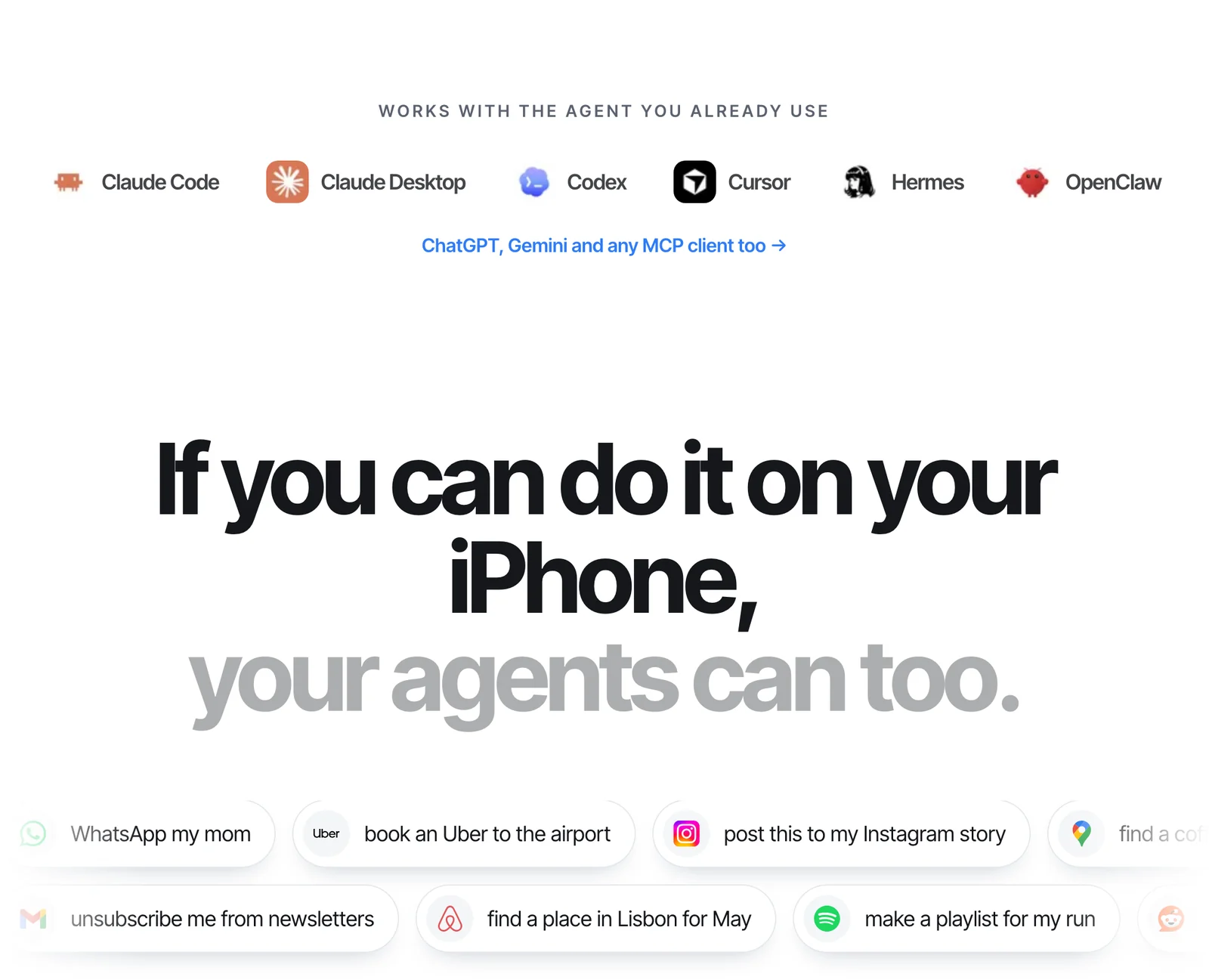
Zeptap connects to the agent you already use: Claude Code, Claude Desktop, Codex, Cursor, Hermes, OpenClaw or any other MCP client.
Key takeaways
- Agents are now good at using screens. Anthropic's latest reported OSWorld-Verified score (78.5%) beats the 72.36% people scored on the original benchmark. What stops them at the phone is access.
- Every other route gives something up. The Simulator can't install App Store apps. Appium needs Developer Mode, a signed helper app and Xcode. iPhone Mirroring is one phone at a time, on your own Apple Account, and isn't available in the EU. Cloud agent services route your screen through their servers.
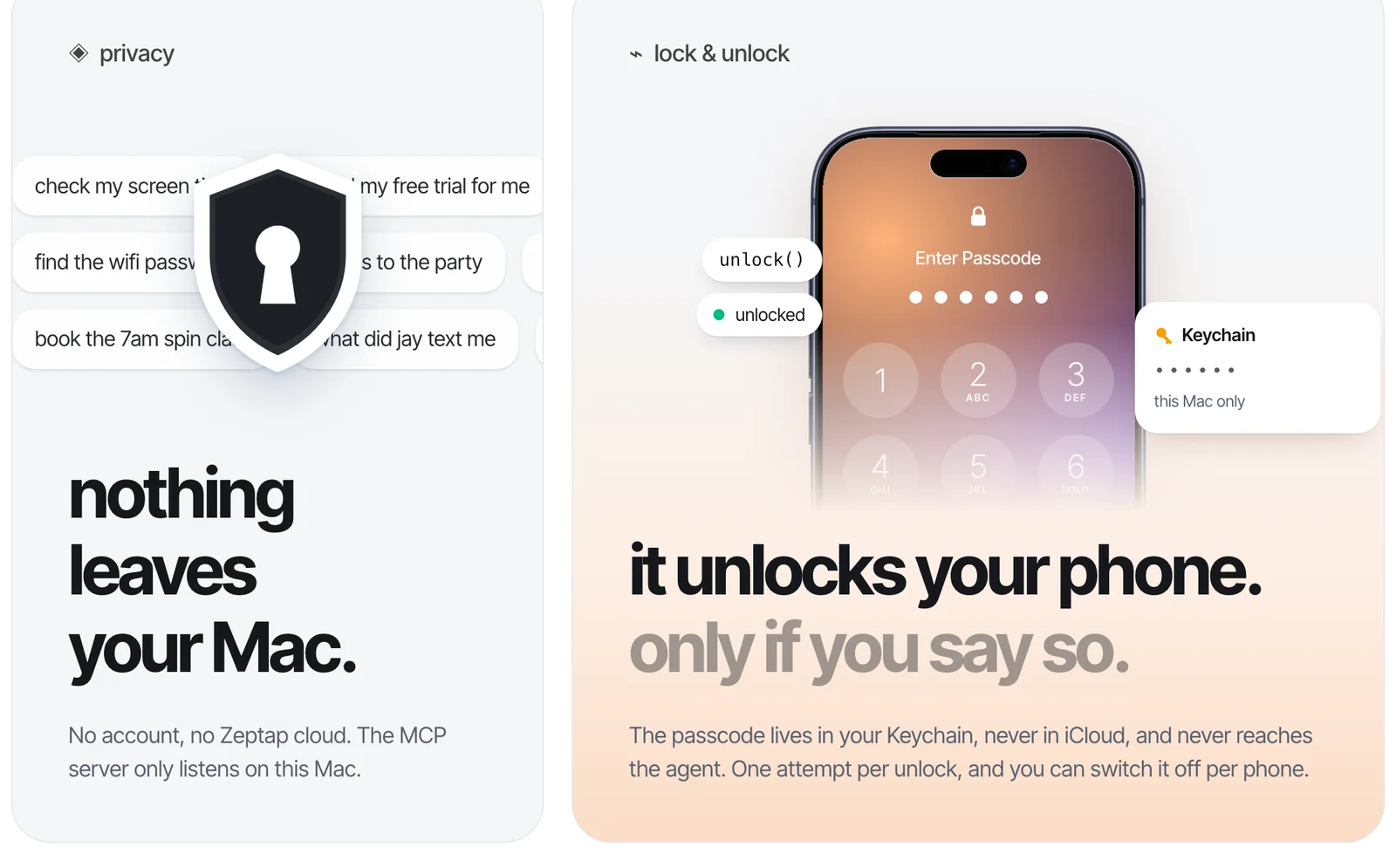
- Zeptap keeps everything on your Mac. There's no account and no Zeptap cloud, and the MCP server only listens on your Mac. It runs on the AI plan you already pay for, with no credits to buy.
- Nothing to set up on the phone: no Developer Mode, no helper app to re-sign every 7 days, no $99 Apple developer fee and no Xcode. A USB cable and a Bluetooth pairing are enough.
- It's built for real work: up to five iPhones at once with a sub-agent on each, and an unlock your agent can use without ever seeing your passcode.
Why can't AI agents use your iPhone?
There's no way in for them. Browser agents read web pages. Computer-use agents get a desktop through screenshots and a virtual mouse. Coding agents get a terminal. An iPhone offers outside software none of that: no remote desktop, no scriptable input, and apps that mostly talk only to their own servers.
That matters because a lot of life happens there. Sensor Tower's State of Mobile 2026 counts 5.3 trillion hours spent in iOS and Google Play apps in 2025, about 3.6 hours a day per mobile user. Apple said in January 2026 that its installed base had passed 2.5 billion active devices (Apple Newsroom).
The usual way to give an agent a job is an API. For phone tasks, the API often doesn't exist, costs money per action, or doesn't cover the job:
- Instagram. Meta describes its API as a way for "Instagram professionals — businesses and creators" to manage their presence through an app (Meta for Developers). It's built for professional accounts, and it does less than the app does.
- X. The API is pay-per-use: $0.015 for each post and $0.20 for a post with a link, as of October 2026 (X Developer Docs).
- Messages. Apple's Messages framework is for building sticker packs and iMessage apps. There's no API for reading or sending your texts.
- Everything else. Your gym's booking app, the grocery app, your bank. Most apps never publish an API.
We broke the API math down for social posting in posting to social media without an API.
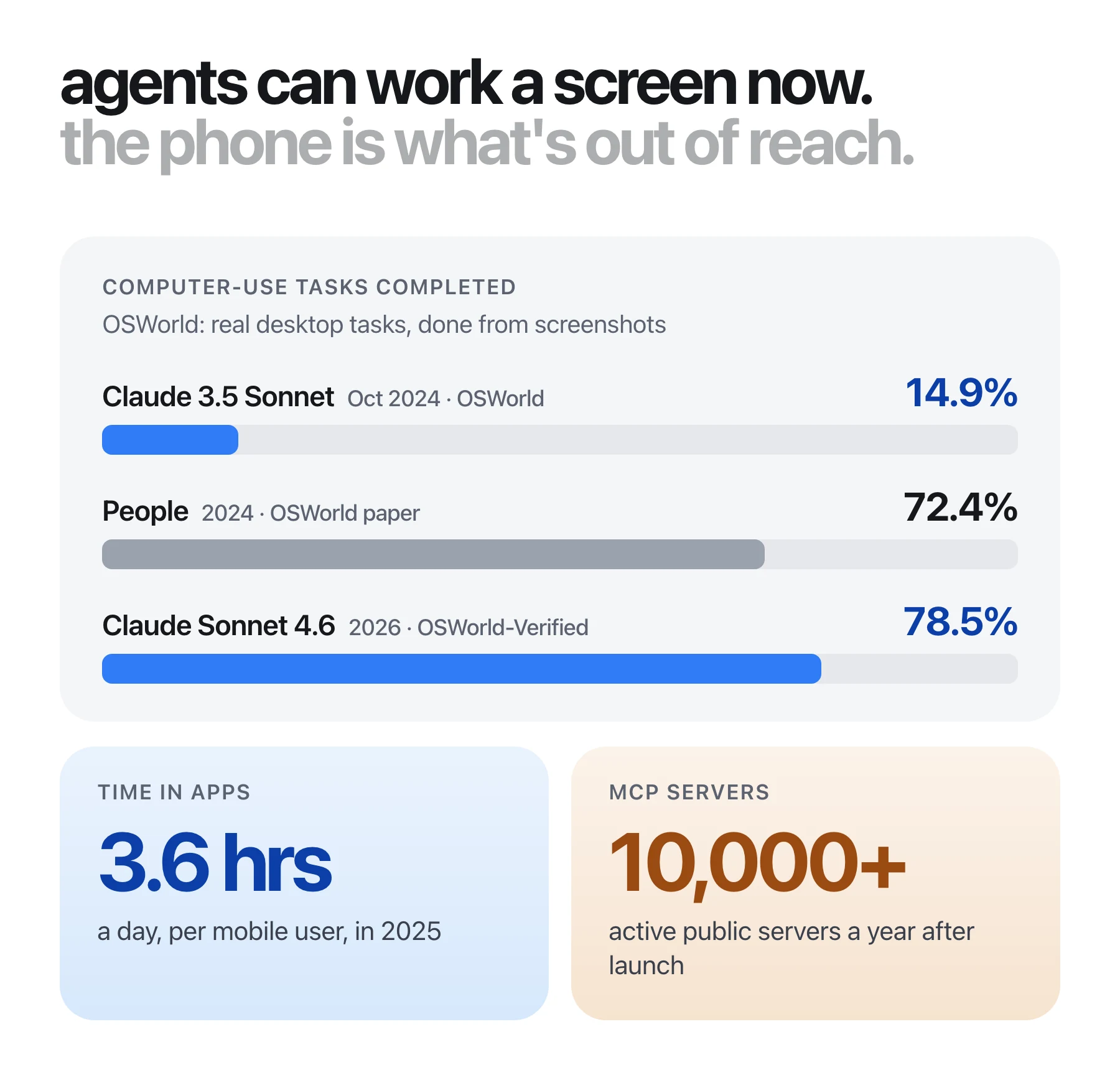
Sources: Anthropic, Oct 2024 (14.9%, screenshot-only OSWorld); Xie et al., 2024 (people, 72.36%); Anthropic, Jun 2026 (78.5% on OSWorld-Verified, a revised version of the test with an updated method, so the bars aren't a strict like-for-like comparison); Sensor Tower, Jan 2026; Anthropic, Dec 2025.
The last tile is why this can work now. Anthropic open-sourced the Model Context Protocol (MCP) in November 2024 as a standard way to plug tools into AI assistants. By December 2025 it reported more than 10,000 active public MCP servers and 97 million monthly SDK downloads, with ChatGPT, Cursor, Gemini, Microsoft Copilot and VS Code all supporting it (Anthropic). If the phone speaks MCP, almost every agent can use it.
Where the other ways to give an agent an iPhone fall short
There have been five ways to put an agent in front of an iPhone. Each one works for some jobs, and each gives up something that matters when the phone is yours.
The iOS Simulator can't install your apps
The Simulator runs a virtual copy of iOS inside Xcode. There's no App Store, so it can't download Instagram, WhatsApp or your bank, and none of your accounts are on it. It only runs apps you build yourself, which means installing Xcode and setting up a developer project first. Apple's own docs say simulators "don't replicate the performance or features of a physical device" (Apple Developer). See Zeptap vs the iOS Simulator.
Appium and WebDriverAgent need a developer setup on your phone
These drive a real device, but only after a developer setup. Appium's docs require Developer Mode on iOS 16 and later, plus a WebDriverAgent helper app with "a valid provisioning profile" (Appium XCUITest driver). Apple warns that Developer Mode "reduces the security of your device" (Apple Developer). On a free Apple account, provisioning profiles "expire 7 days from issuance" (Apple Developer), so the helper app stops working every week unless you pay $99 a year for a developer membership. That's fine for a test phone in CI. It's a poor fit for the phone with your bank and your 2FA codes. See Zeptap vs Appium.
iPhone Mirroring is one phone, on your account, outside the EU
Apple's iPhone Mirroring shows your iPhone in a window on your Mac. It's built for one person at the keyboard, and Apple's support page lists the limits (Apple Support):
- "iPhone Mirroring is currently unavailable in the European Union."
- "iPhone Mirroring can be used with only one Mac and one iPhone at a time."
- The Mac and iPhone must be signed in to the same Apple Account, with two-factor authentication.
- "Access to the iPhone camera and mic is not available in iPhone Mirroring, including for Face ID or phone calls."
- The iPhone has to stay locked and near the Mac, on macOS Sequoia and iOS 18 or later.
Mirroring has no API of its own, so agent tools built on it drive the Mac window from outside and inherit every one of these limits. See Zeptap vs iPhone Mirroring.
Cloud agent services and device farms aren't your phone, or your servers
Cloud services put someone else's computer between your agent and the phone. One iPhone-agent service says commands, screenshots and live streams from your phone are processed on its servers in the United States, and screenshots are kept until you ask for them to be deleted (its data processing agreement). Another says it collects your commands and the actions its AI takes, and uses that data, once anonymised, to train its models (its privacy policy). Device farms such as BrowserStack rent you phones that are wiped after each session, so your accounts are never on them (BrowserStack). See all our comparisons.
Siri AI is Apple's assistant, not your agent
Apple's own answer arrived on September 14, 2026: Siri AI, rolling out in beta in English with iOS 27, can take actions in and across apps (Apple Newsroom). It's good news for iPhone owners. But it needs an iPhone 16 or later, isn't available at first in the EU, and has daily usage limits on its server features. It also doesn't let you hand the phone to the agent you already work with: the Claude Code or Codex session that knows your project, your files and your prompts.
|
|
Zeptap |
iOS Simulator |
Appium / WebDriverAgent |
iPhone Mirroring tools |
Cloud agent services |
|---|---|---|---|---|---|
|
Your real iPhone, with App Store apps and your accounts |
Yes |
No |
Yes |
Yes |
Varies; device farms are wiped |
|
Your screen stays on your Mac |
Yes |
Yes |
Yes |
Yes |
No, it goes through their servers |
|
Developer Mode off |
Yes |
Not applicable |
No |
Yes |
Varies |
|
Nothing installed or re-signed on the phone |
Yes |
Not applicable |
No, a helper app every 7 days on a free account |
Yes |
Varies |
|
No Xcode or $99 developer membership |
Yes |
No, needs Xcode |
No |
Yes |
Varies |
|
Several iPhones at once |
Up to 5 |
Not a real phone |
Yes, each with its own setup |
No, one at a time |
Varies |
|
Any Apple Account, works in the EU |
Yes |
Yes |
Yes |
No |
Varies |
|
Can unlock the phone for the agent |
Yes, if you allow it |
Not applicable |
Limited |
No, the phone stays locked |
Varies |
|
Runs on your own AI plan |
Yes |
Depends on the agent |
Depends on the agent |
Yes |
Often credits or a subscription |
What Zeptap does differently
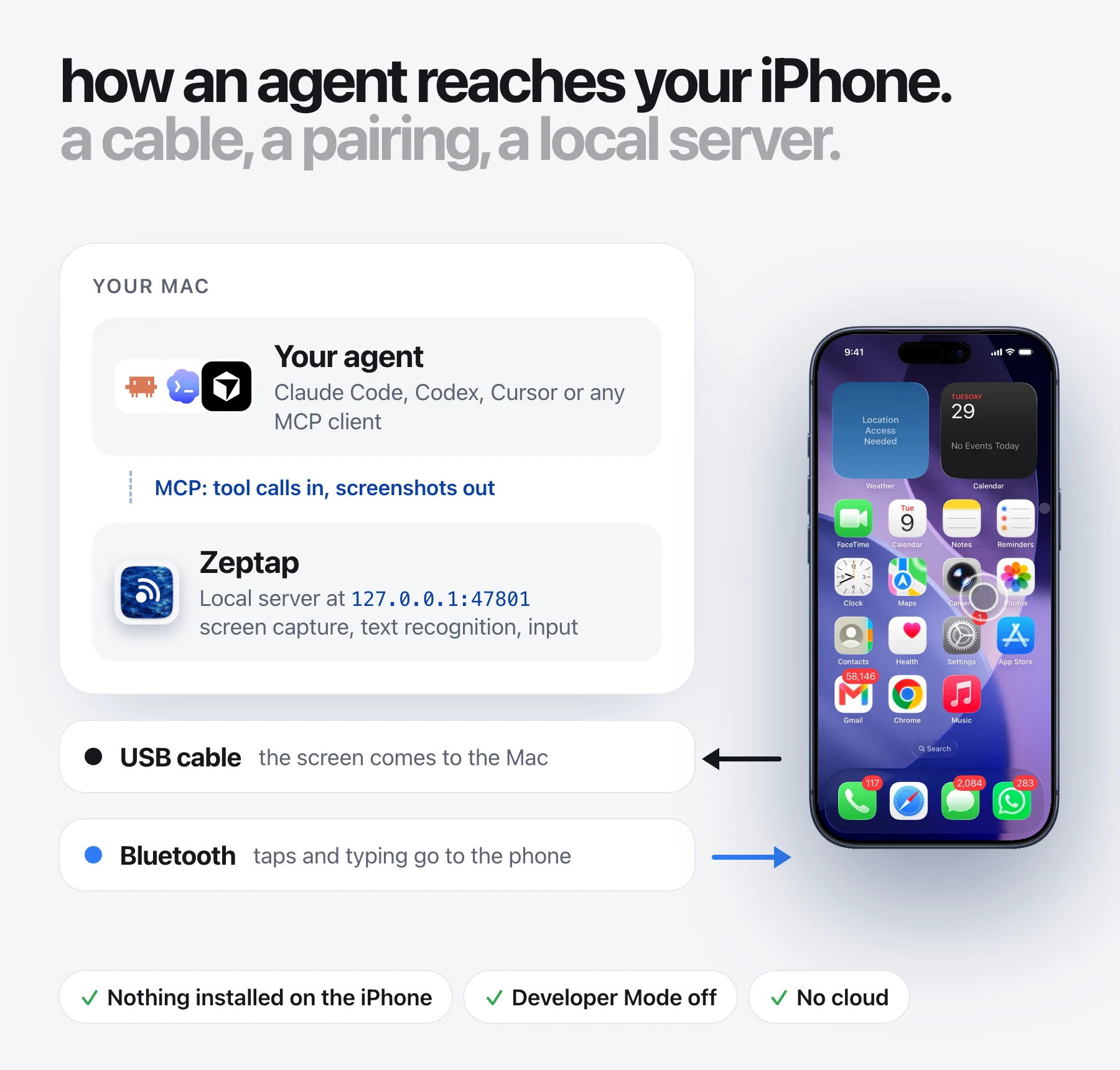
Zeptap's answer is to keep the phone yours and the setup small: the screen comes over a USB cable, taps and typing go over Bluetooth, and your agent connects to a server on your own Mac. Everything else follows from that.
Nothing leaves your Mac
Zeptap has no account and no Zeptap cloud. The screen is captured and read on your Mac, and the MCP server only accepts connections from that Mac. Screenshots go to the agent you connect, and from there to the model provider you chose for it. Nothing passes through a Zeptap server, so there's nothing for us to store, keep or train on.
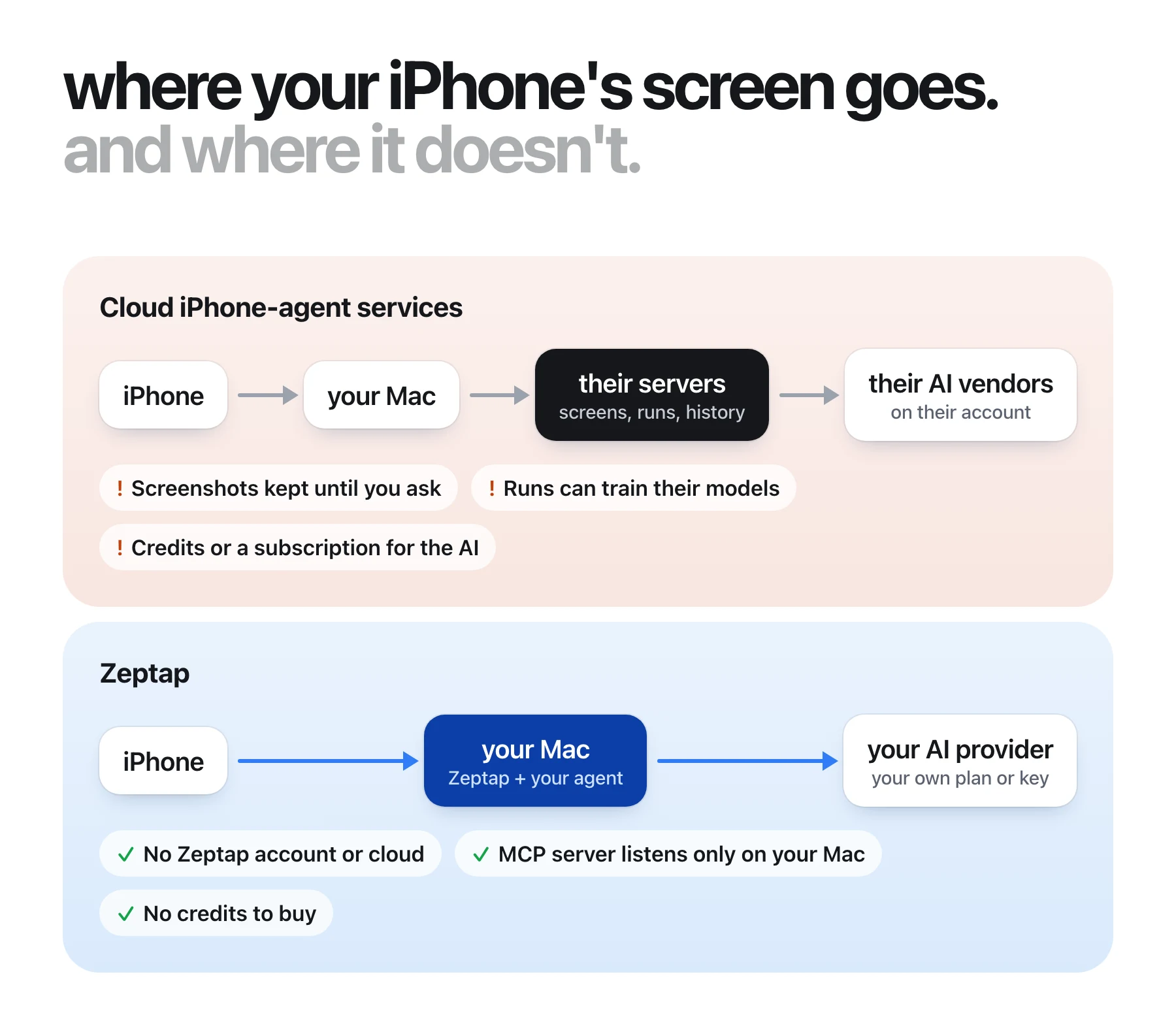
Cloud-service points come from their own documents, linked above. Zeptap's path is in our privacy reference.
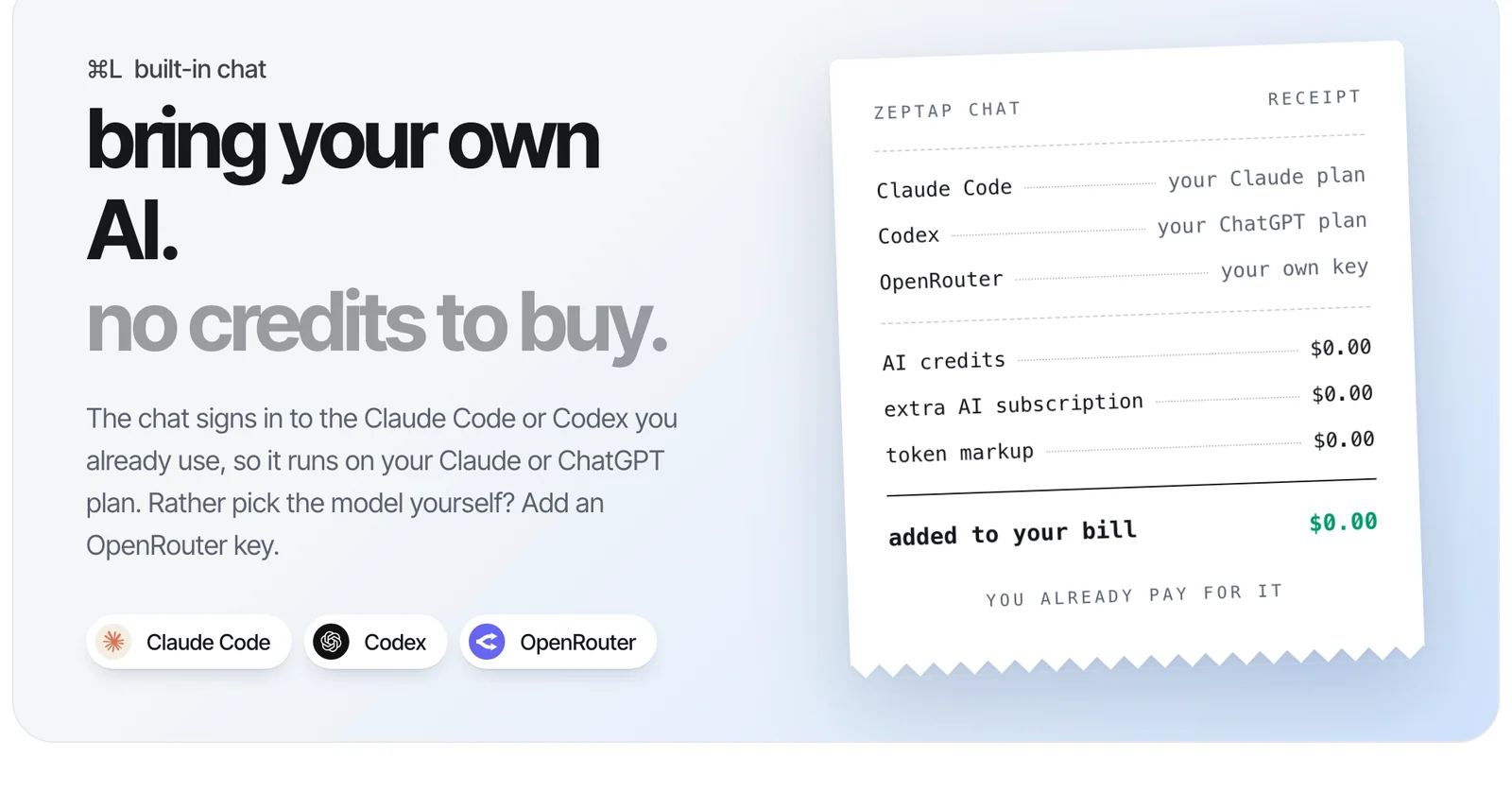
Bring your own AI, no credits to buy
Zeptap doesn't sell AI. Connect Claude Code, Codex, Cursor or any MCP client and it runs on that tool's plan. If you'd rather not set up an agent at all, the built-in chat (⌘L) signs in to the Claude Code or Codex you already use, so it runs on your Claude or ChatGPT plan, or on any model through your own OpenRouter key.
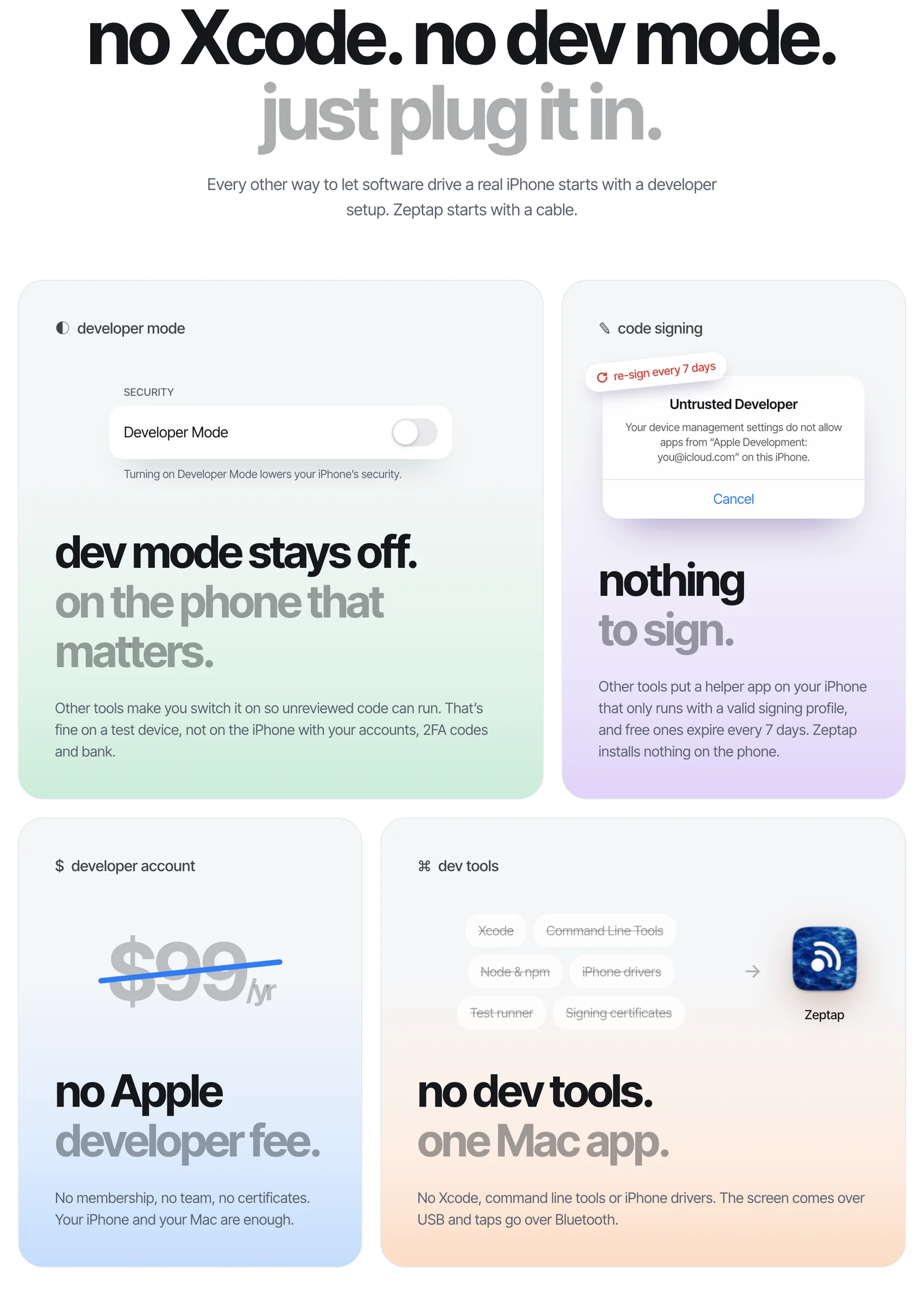
No Xcode, no Developer Mode: just plug it in
Every other way to let software drive a real iPhone starts with a developer setup. Zeptap starts with a cable.
- Developer Mode stays off. Other tools make you switch it on so unreviewed code can run. That's fine on a test device, not on the iPhone with your accounts, 2FA codes and bank.
- Nothing to sign. Other tools put a helper app on your iPhone that only runs with a valid signing profile, and free ones expire every 7 days. Zeptap installs nothing on the phone.
- No Apple developer fee. No $99-a-year membership, no team, no certificates. Your iPhone and your Mac are enough.
- No dev tools. No Xcode, command line tools or iPhone drivers. One Mac app.
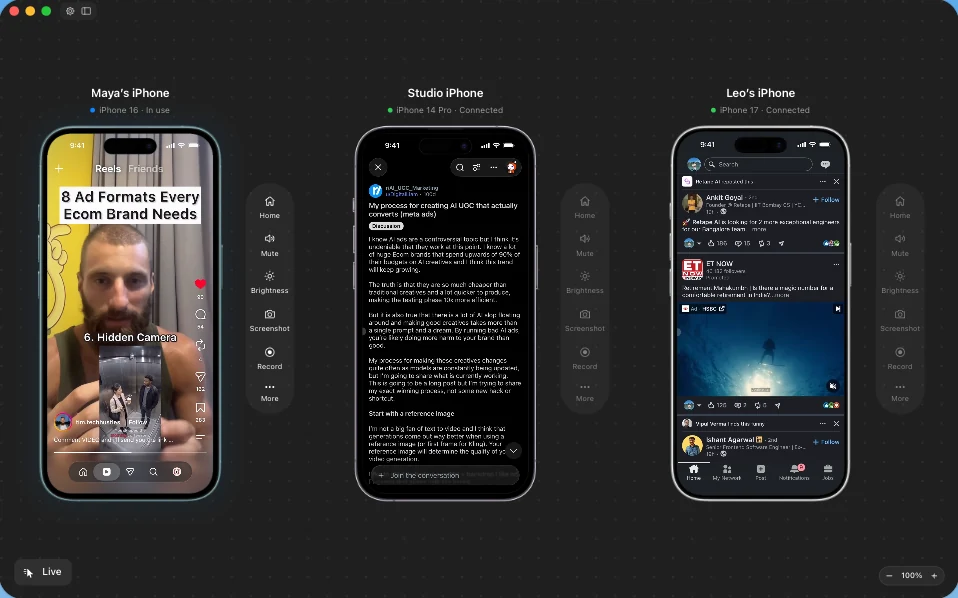
Several iPhones at once, with a sub-agent on each
Plug in up to five iPhones (Lifetime Plus) and Zeptap shows them side by side, each signed in to its own accounts. Ask the built-in chat for a job across them and its lead agent starts a sub-agent on each phone. The sub-agents work in parallel, and the lead sums up what each one did. Agents you connect over MCP see every phone too: list_phones lists them and each tool can target one, so a Claude Code session can split the work across its own sub-agents, one per phone.
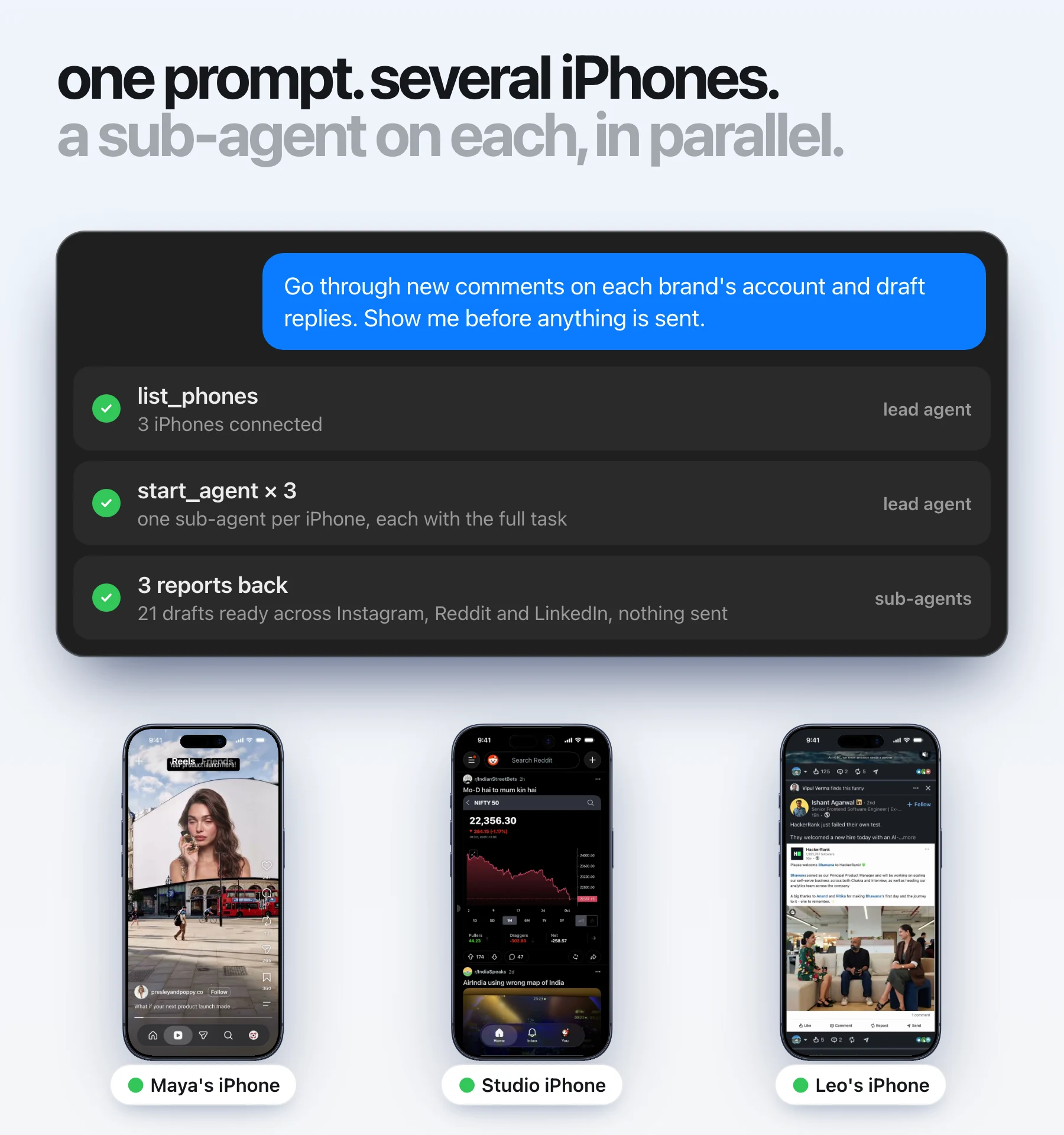
An illustration of the flow. Each sub-agent drives only its own iPhone and reports back to the lead.
This is where Zeptap differs most from iPhone Mirroring, which works with one iPhone at a time on the Mac's own Apple Account. With Zeptap the phones can be on any Apple Account: yours, a brand's, a client's or a test account.
It unlocks your phone, only if you say so
Agents can lock the iPhone and, if you allow it, unlock it, so a job doesn't stall on the lock screen. The passcode lives in your Mac's Keychain, never in iCloud, and never reaches the agent: Zeptap types it over Bluetooth itself. Each unlock makes one attempt, so a stale passcode can't lock you out, and you can switch unlocking off for each phone. iPhone Mirroring works the other way around: the phone has to stay locked, and Face ID isn't available.
Details in lock and unlock.
Any iPhone, any Apple Account, anywhere
Zeptap works with every iPhone on iOS 15 or later, home-button models included, on a Mac with macOS 14 or later. The iPhone doesn't have to share an Apple Account with the Mac. And a USB cable and Bluetooth work the same in every country, so nothing Zeptap relies on is region-locked, including in the EU.
How Zeptap gives an agent a real iPhone
Zeptap uses a cable, a Bluetooth pairing and a local server. Nothing runs on the iPhone itself.
- The screen comes over USB. Your Mac captures the iPhone's screen through the cable and reads the text on it with on-device text recognition.
- Touch and typing go over Bluetooth. The Mac acts as a Bluetooth keyboard and pointer. iOS already supports pointer devices through AssistiveTouch (Apple Support), and Zeptap turns AssistiveTouch on for you over USB.
- Your agent connects over MCP. Zeptap runs an MCP server at
http://127.0.0.1:47801/mcp. Your agent calls tools likescreenshot,tap_text,type_text,flickandopen_app, and every action returns a screenshot once the screen settles.
Settings › Connectors adds Zeptap to Claude Code, Claude Desktop, Codex, Cursor, Hermes and OpenClaw in one click. Any other MCP client can connect by hand. In Claude Code, that's one command:
claude mcp add --transport http --scope user zeptap http://127.0.0.1:47801/mcpBecause the agent sees the same screen you do, it doesn't need an integration for each app. If you can tap it, your agent can: App Store apps, Messages, Settings, Safari and Photos. Zeptap's guidance for agents tells them to stop and check with you before purchases, posts, deletions or messages to new people, and you can watch every tap from your Mac. The connection guide covers each client, and the tool reference lists every tool.
What people hand off to an agent with an iPhone
People use it for jobs that only exist inside an app, on the account they're already signed in to.
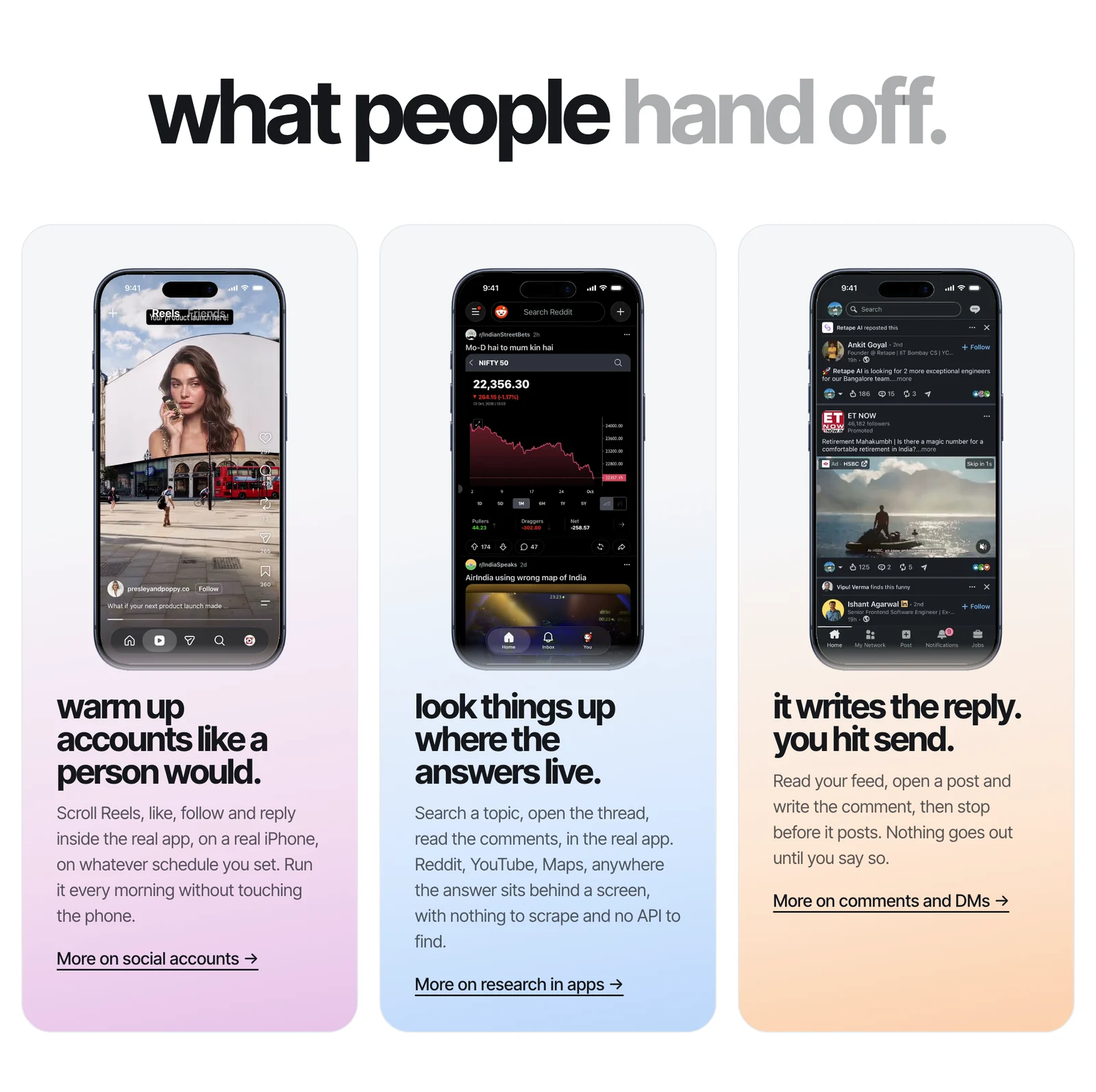
- Social accounts, without the API. Post to X, Instagram, TikTok and LinkedIn from your own accounts, including personal Instagram accounts and Stories with link stickers. The agent can show you the preview before it posts. See social media use cases.
- Comments and DMs. The agent reads the thread and drafts the reply, then waits for you to send it. See comments and DMs.
- Testing your own app on a real phone. Push notifications, SMS sign-in codes, the share sheet and larger text sizes behave differently on hardware. See app testing.
- Everyday errands. Move a meeting, find a coffee shop that's open now, book the 7am class. See everyday use cases.
A first prompt can be as plain as this:
Install the newest TestFlight build, go through sign-up as a new user and tell me where it breaks.
The agent installs the build, works through onboarding, and reports the step that failed with a screenshot and the steps to reproduce it. There are more in the prompt library.
Platform rules still apply. X's automation rules name automation outside its API as grounds for suspension, and following each platform's rules is up to you. Zeptap isn't built for fake engagement, bulk account creation or device spoofing.
When Zeptap is the wrong tool
Zeptap does one thing: it lets an agent operate real iPhones plugged into your Mac. Use something else for:
- Android phones, the iOS Simulator, Windows or Linux. Zeptap drives a real iPhone from a Mac only.
- Remote phones. The iPhone has to be plugged into the Mac running Zeptap.
- Large scripted test suites across many devices. Use XCUITest, Appium or a device farm.
- Thousands of unattended posts on a timer. Use the platform's API. Zeptap has no built-in scheduler.
How to get started
Setup takes a few minutes, and there's nothing to install on the phone.
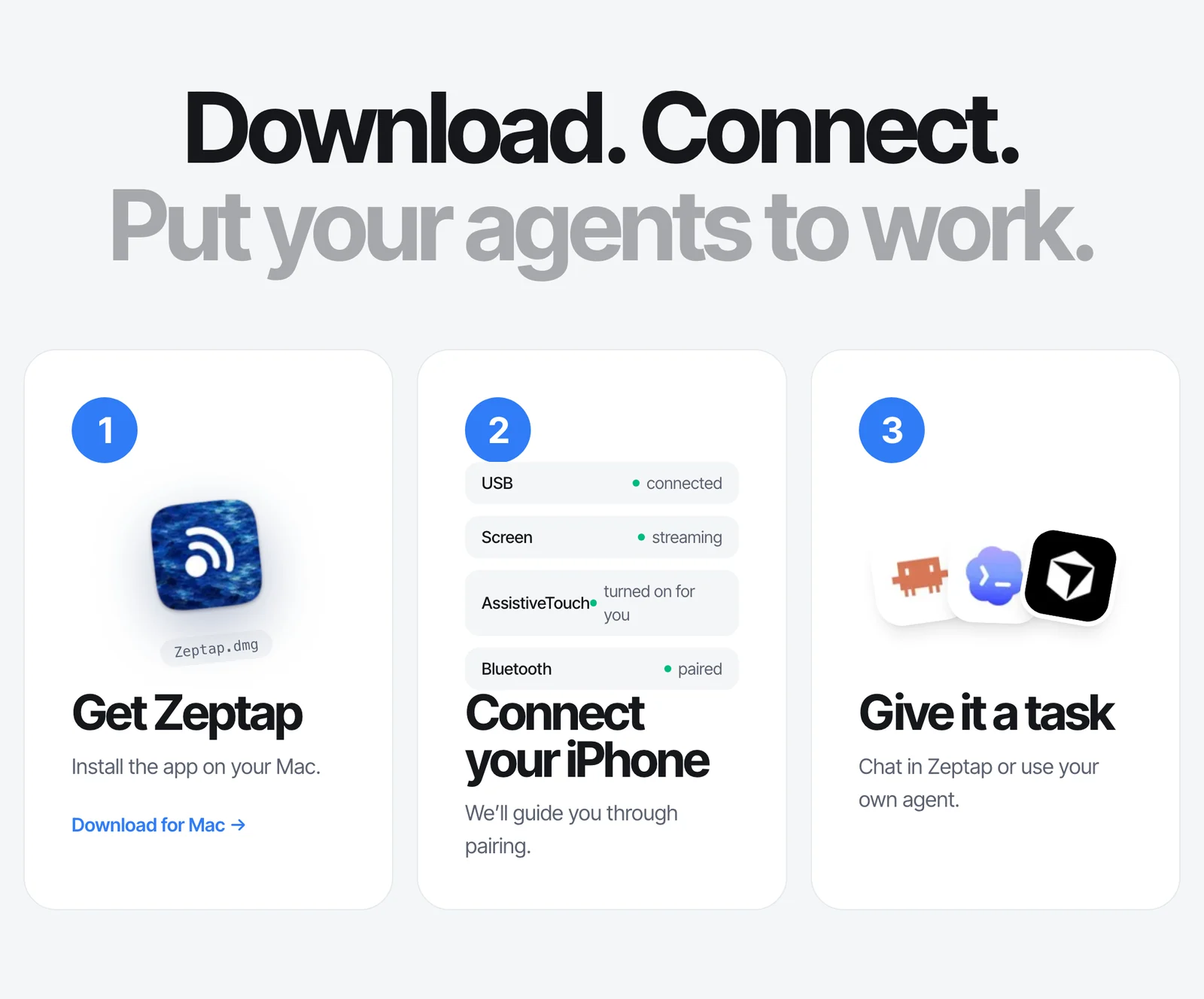
- Download Zeptap for a Mac on macOS 14 or later.
- Plug in your iPhone and pair it over Bluetooth. Any iPhone on iOS 15 or later works. The setup assistant walks you through it.
- Give your agent a task. Connect Claude Code, Codex or Cursor from Settings › Connectors, or open the built-in chat. Start with "Take a screenshot and tell me what's on my iPhone."
Your first hour of live use is free. After that, it's $25 a month or $99 once for one iPhone, or $149 once for up to five iPhones at the same time, at introductory prices (pricing). Every license covers three Macs. For a full walkthrough with Claude, read how to let Claude control your iPhone.
Frequently asked questions
Do I need to jailbreak my iPhone or install an app on it?
No. The iPhone stays on its normal iOS with nothing installed and Developer Mode off. The only step on the phone is pairing it with your Mac over Bluetooth, and Zeptap turns on AssistiveTouch for you over USB.
Do I need Xcode or an Apple Developer account?
No. There's no Xcode, no $99 developer membership, no signing and no weekly re-install. You need a Mac on macOS 14 or later with Bluetooth, an iPhone and a USB cable.
Does Zeptap send my screen to its servers?
No. Zeptap has no account and no cloud. The screen is captured and read on your Mac, and the MCP server only listens there. Screenshots go only to the agent you connect, and from there to the model provider you chose for it.
Can one agent use more than one iPhone?
Yes. Lifetime Plus runs up to five iPhones at the same time. The built-in chat starts a sub-agent on each phone and they work in parallel, and agents you connect over MCP can list the phones and target each one.
How is Zeptap different from iPhone Mirroring?
iPhone Mirroring lets one person use one iPhone from a Mac window, on the same Apple Account, with the phone locked and Face ID unavailable, and it isn't available in the EU. Zeptap gives agents tools over MCP to see and operate up to five iPhones, on any Apple Account, on iOS 15 or later, and works in the EU.
Give your agent an iPhone
For two years, agents have been getting better at using screens. The phone, where much of the day happens, stayed out of reach because there was no good way in. The ones that existed asked you to put Developer Mode on your phone, send your screen through someone else's servers, or settle for one iPhone at a time. Zeptap gives agents a way in that keeps the phone yours: a cable for the screen, Bluetooth for touch, and a local MCP server that every major agent already understands.
Plug in your iPhone, connect the agent you already use, and give it the job you've been doing by hand. Download Zeptap for Mac, or start with the setup guide.